FREE Read-only

See every AI agent across Microsoft 365 and beyond. For free.

Agent Registry inventories every Copilot, bot and autonomous agent across Teams, Copilot Studio, M365 Copilot Agent Builder, Azure AI Foundry, SharePoint, Entra and Security Copilot — plus external platforms like Amazon Bedrock, Google Vertex AI, Salesforce Agentforce and Databricks Genie — then scores each one for governance risk, so you can focus only on the high-risk agents that can harm your environment. Token forwarding only; nothing is stored server-side.
Any Microsoft Entra tenant No install No data leaves your browser
agent365registry.syskit.com
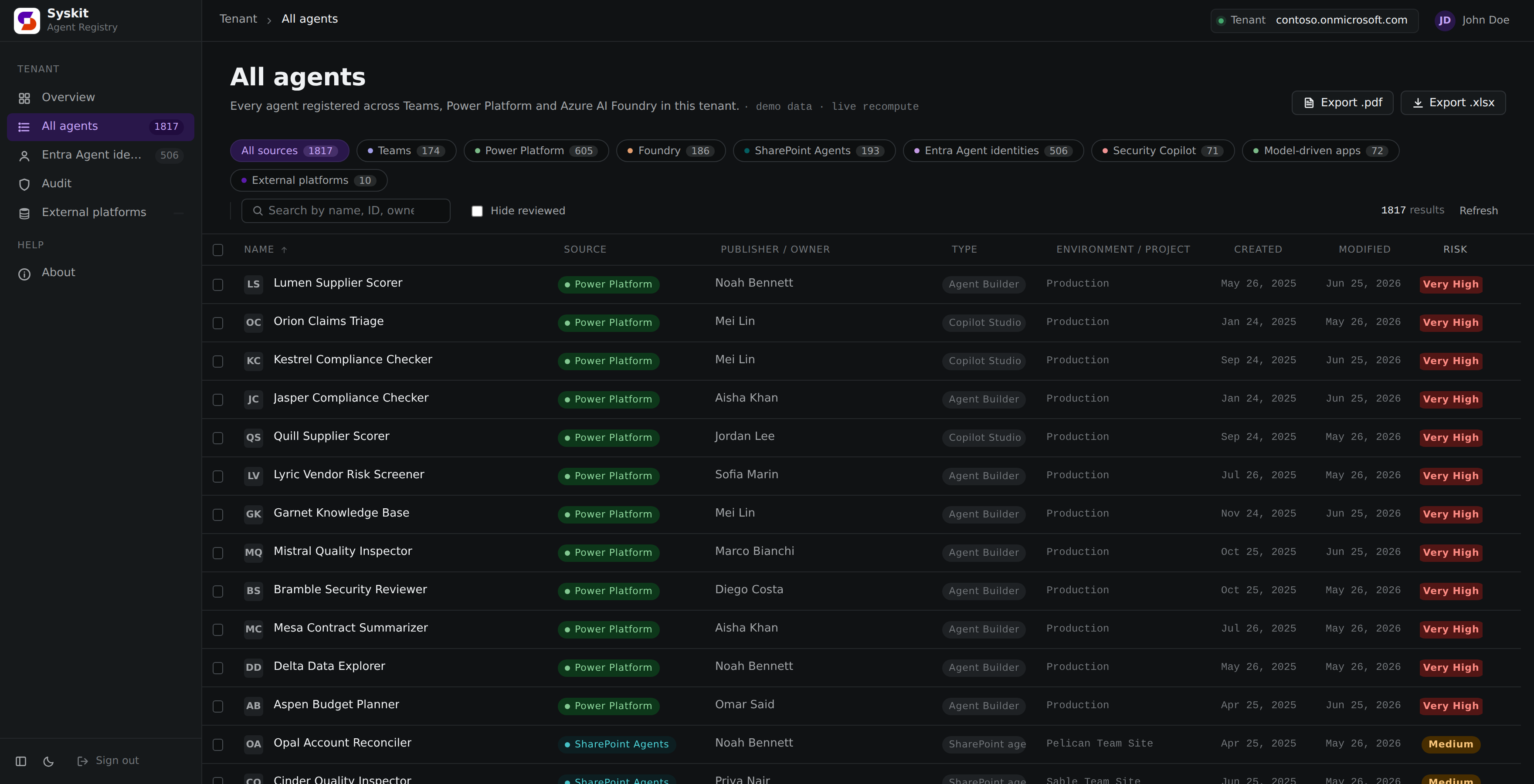
Agent Registry: All agents inventory across Teams, Copilot Studio, M365 Copilot Agent Builder, Foundry, SharePoint and Entra
12 very-high risk agents
flagged across 6 sources
One inventory across every agent surface
Teams apps Copilot Studio M365 Copilot Agent Builder Azure AI Foundry SharePoint Agents Entra Agent identities Security Copilot Amazon Bedrock Google Vertex AI Salesforce Agentforce Databricks Genie ServiceNow AI Agents
Why governance teams run it

Shadow agents are the new shadow IT.

Makers spin up Copilot Studio bots, M365 Copilot Agent Builder agents, Foundry assistants and SharePoint agents faster than IT can track them. Agent Registry gives you the one place to see, and judge the risk of, all of it.

Every source, one grid

Teams app catalog, Copilot Studio, M365 Copilot Agent Builder, Foundry projects, SharePoint .agent files and Entra agent identities. Unified, searchable, sortable.

Risk scoring built in

Flags autonomous orchestration, external HTTP calls, write-capable tools, non-business connectors, orphaned identities and dormant service principals.

Read-only by design

Default scopes are .Read across every workload. Delete actions are a separate, opt-in, admin-consented grant. Never the default.

Export & audit

One-click .xlsx / .pdf export, plus a cross-source Copilot activity view straight from the unified audit log.

Cost & billing

Exact Copilot credits per agent and per user, plus messages and sessions from transcripts. Pulled with your normal sign-in, no device code, month to date or last 3 months.
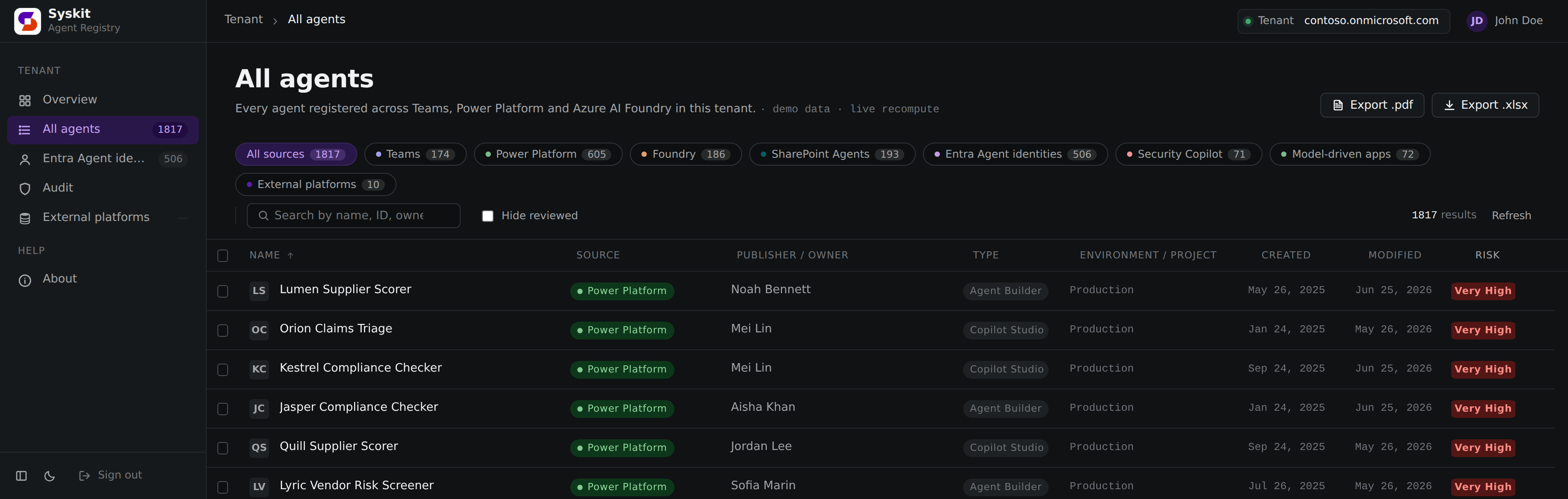
… / agents · sorted by risk
All agents sorted by risk: very-high risk agents from every source float to the top of the inventory
Triage by risk

Don't review 1817 agents. Start with the 12 that matter.

Checking every agent in the tenant doesn't scale, and doesn't make sense. The inventory is ranked by risk score, so the agents that can actually harm your environment sit at the top of the list.
  • Very-high risk floats to the top, sorted by score, not alphabet
  • One ranked list across every source: Power Platform, Foundry, Entra and the rest
  • Orphaned and no-owner agents stand out instantly
… / overview
Tenant overview dashboard: KPIs for total agents, very-high risk, limited visibility and dormant identities
Tenant overview

Your whole tenant at a glance.

One dashboard tells you where to look first, before you ever open the grid.

  • Total agents across every source
  • Very-high-risk count: tool / HTTP / autonomous
  • Limited visibility and dormant identities, surfaced
… / risk-model
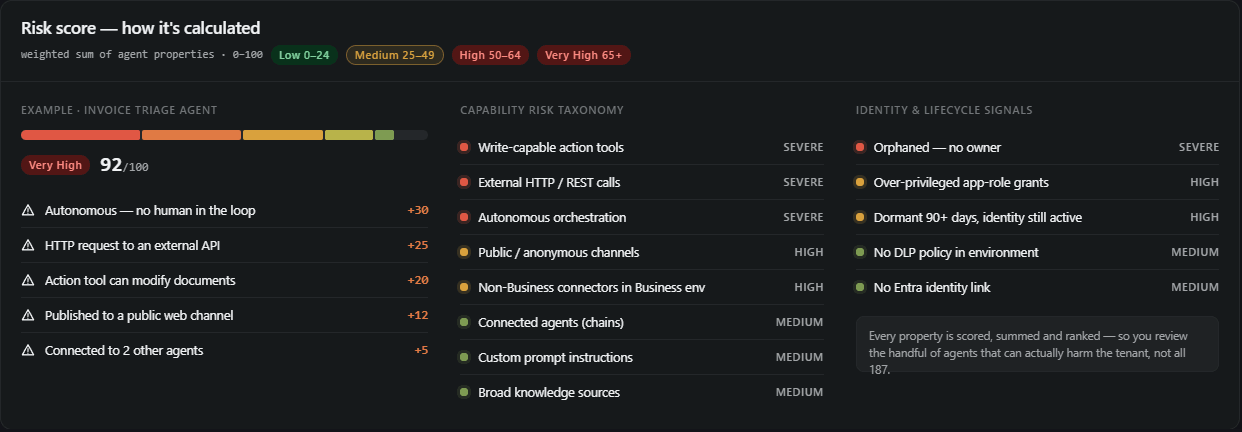
Risk score methodology: capability risk taxonomy and identity signals, weighted into a 0 to 100 score per agent
Capability risk taxonomy

Every property scored. One number to act on.

The risk score isn't a gut feeling, it's calculated from the agent's actual properties: what its capabilities can do, where it's published, and who (if anyone) owns it. The result is a weighted 0 to 100 score that puts the agents that matter in front of you.
  • Capability risks weigh most: write-capable tools, external HTTP calls, autonomous orchestration, public channels
  • Identity & lifecycle signals add weight: orphaned, dormant, over-privileged, no DLP policy
  • Scores map to Low / Medium / High / Very High, so you review the top of the list, not all 187
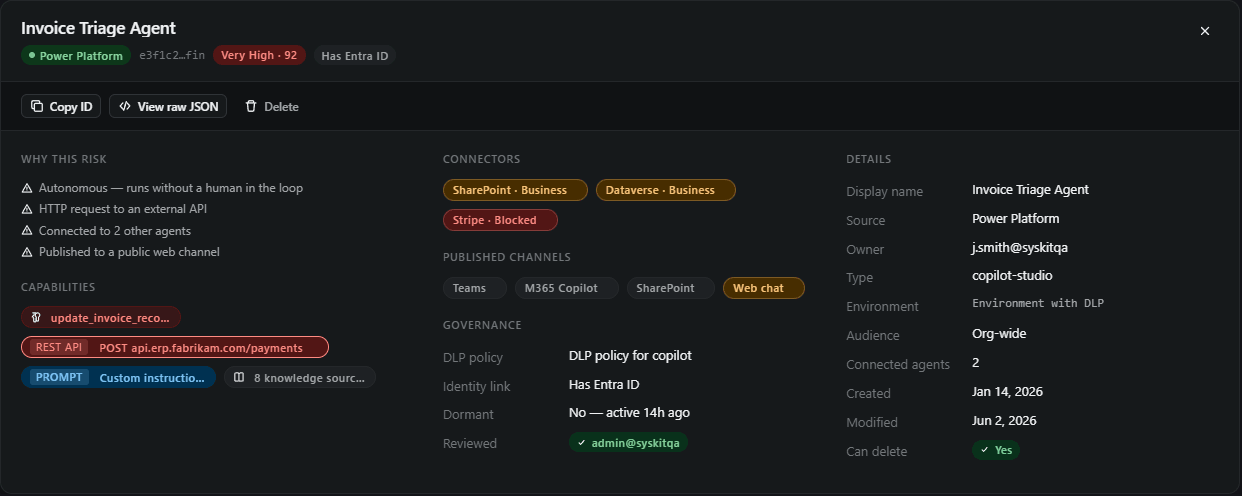
… / agents / invoice-triage-agent
Agent detail panel: risk factors, capabilities, connectors, published channels, governance and full metadata for a single agent
Agent details

Powerful detail on every agent.

Click any row and see exactly what the agent can do: why it got its risk score, which tools and connectors it holds, where it's published, and who owns it.
  • Risk factors in plain language: autonomous runs, external HTTP calls, connected agents, public channels
  • Governance signals: DLP policy, Entra identity link, dormancy, review status
  • Capabilities, connectors, channels, audience and full metadata
… / cost
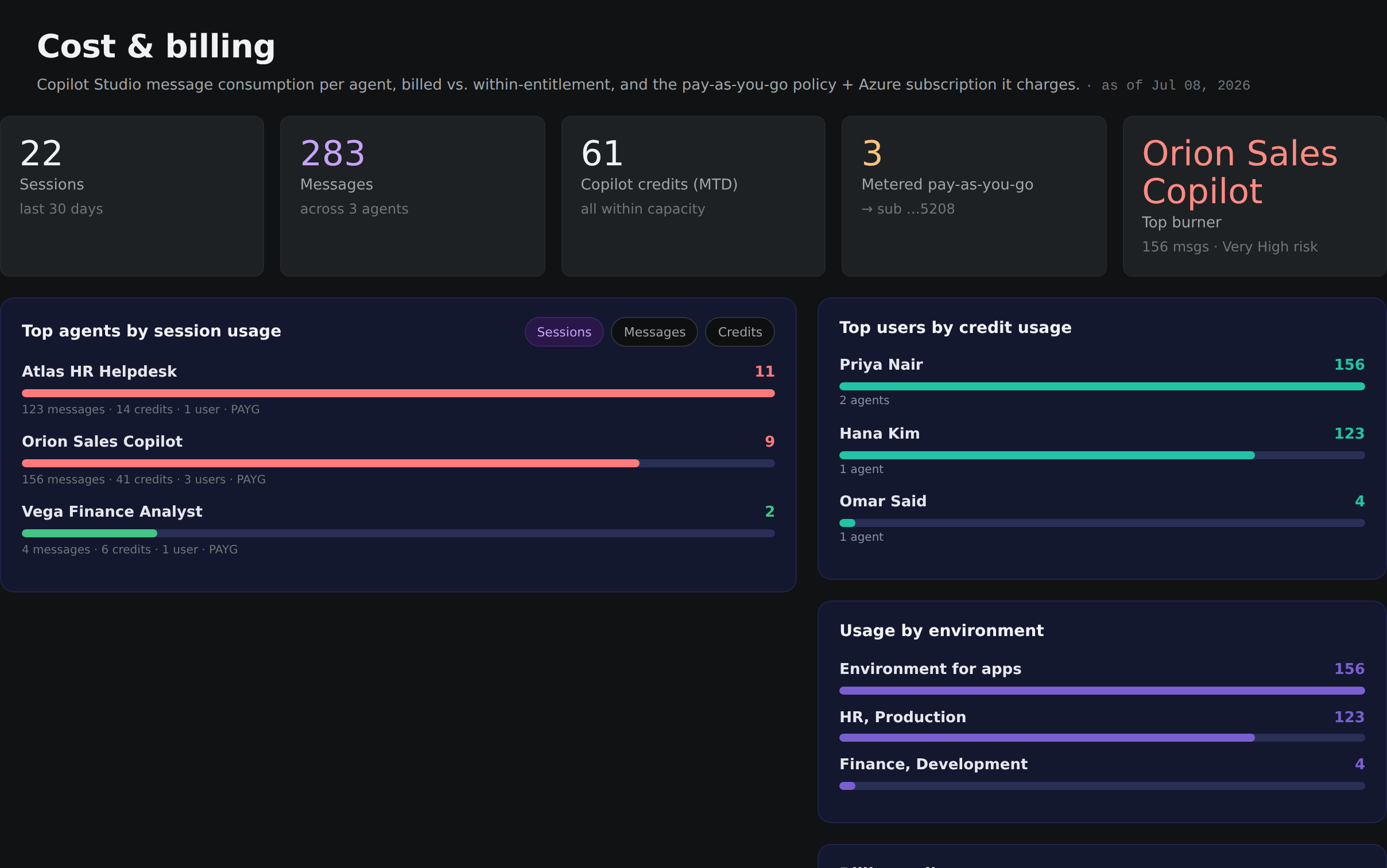
Cost and billing dashboard: sessions, messages and Copilot credits per agent, top users by credit usage, usage by environment and the pay-as-you-go billing policy
Cost & billing

See what every agent consumes, and what it costs.

Exact Copilot credits per agent, straight from the Power Platform licensing API with your normal sign-in, no device code, no export to paste. Sessions and messages are counted from the conversation transcripts, on the same window Copilot Studio's own Monitor uses.

  • Exact Copilot credits per agent and per user, month to date or the last 3 months
  • Messages & sessions from transcripts, matching Copilot Studio Monitor
  • Pay-as-you-go policy and the Azure subscription each agent bills to
  • Every figure links back to its source in the admin center to cross-check
From zero to inventory in three steps

How it works

No agents to install, no database to host. It runs in your browser and talks to Microsoft directly.

STEP 01

Register an app

Create a single-page App Registration in Entra, or run the in-browser Grant admin consent flow. Paste the Application (client) ID and you're set. You'll be asked to consent multiple read permissions. All are described below.

STEP 02

Sign in with Microsoft

Delegated and read-only. The app acts as you and forwards your token; it never holds standalone application rights.

STEP 03

See every agent

Inventory, risk scores and audit populate across all sources instantly. Drill into any agent's tools, connectors and permissions, then export.

Read-only by design

Your data never leaves your browser.

The whole point is to see every agent in the tenant without changing anything. Inventory, risk analysis and every export run entirely on read scopes.

"auth": { "mode": "delegated", "storage": "none" },
"scopes": [ "*.Read.All" ],
"writeScopes": "opt-in · admin-consented"

Token forwarding only

Your browser talks to Microsoft directly. The app forwards your token and stores nothing server-side.

Delegated-only

It acts as you, never as a standalone app with its own rights. Single- or multi-tenant, your choice.

Write is opt-in

The two ReadWrite scopes that unlock Delete are separate and never part of the default consent.

Degrades gracefully

A missing role only hides one source or one signal. It never breaks sign-in for everything else.

What permissions does this need?

Delegated, read-only scopes. Consented once.

Agent Registry is delegated-only: it acts as you, never as an app. The App Registration is single-tenant. It lives in your tenant and only accounts from your tenant sign in to it. The first sign-in triggers a standard Microsoft consent prompt; a Global Administrator approves once, and every user in that tenant can then sign in normally.

Read-only by default

Inventory, risk analysis, every export and every drill-through run entirely on the .Read.* scopes below.

Delete is opt-in

The two ReadWrite scopes that unlock per-agent Delete live in a separate section below, not in the default admin-consent flow.

Microsoft Graph delegated · read-only
User.ReadSign-in / profile
User.ReadBasic.AllResolve agent owners → name / email
Group.Read.AllTeams app catalog group membership
AppCatalog.Read.AllTeams agent inventory
AuditLogsQuery.Read.AllAudit view + per-agent activity
AuditLog.Read.AllService-principal sign-in → dormant detection
Directory.Read.AllSP type, privileged roles, federated creds
Policy.Read.AllConditional Access coverage map
AgentIdentity.Read.AllpreviewEntra Agent identities source
Files.Read.AllSharePoint Agents: read .agent files
Sites.Read.AllSharePoint deep-scan beyond search index
InformationProtectionPolicy.ReadReal Purview sensitivity-label names
Azure Service Management delegated
user_impersonationAzure AI Foundry project enumeration
Azure Machine Learning Services delegated
user_impersonationAzure AI Foundry data-plane: agent instructions / tools / runs
Power Platform API delegated
ResourceQuery.Resources.ReadPP Inventory: primary Copilot Studio agent fetch
EnvironmentManagement.Environments.ReadEnumerate Power Platform environments
CopilotStudio.MinimalBot.ReadPer-env Copilot Studio bot list
CopilotStudio.MinimalBot.ReadWriteRead who an Agent Builder agent is shared with. Microsoft gates this share-read behind a write-capable scope (no read-only variant exists); the app only reads, never writes.
CopilotStudio.MakerOperations.ReadMaker-context bot / agent metadata
Dynamics CRM / Dataverse delegated
user_impersonationPer-env Dataverse: bot, appmodule, systemusers tables
For full governance opt-in · ReadWrite
AppCatalog.ReadWrite.AllgovDelete Teams app from the org catalog
Files.ReadWrite.AllgovDelete SharePoint .agent file
Dataverse prvDeleteBotgovDelete a Copilot Studio agent via the Dataverse PvaDeleteBot custom action, the same call Copilot Studio uses from its own UI (cascades through topics, knowledge sources, tools). Uses the Dataverse access you already grant for reads, no new OAuth scope.

Foundry agent deletes are likewise role-gated, not scope-gated.

Roles the signed-in user must hold degrades gracefully
Agent ID Administrator or Agent ID Developer (Entra)Entra Agent identities source
System Administrator or System Customizer (Dataverse, per env)Copilot Studio bots + model-driven apps
Azure AI Developer (Foundry, subscription scope covers all projects)Foundry agents + tools + instructions
Power Platform AdministratorCross-environment PP Inventory results
Global Administrator or Application AdministratorAdmin-consent the app the first time

OAuth scopes alone aren't enough; these are role assignments. The app degrades gracefully per source: a missing role only hides one source or one signal, never breaks sign-in.

Want a tour first?

View the live demo.

The sample report shows you the agents already living in your environment that carry real risk: autonomous bots, external API callers and over-permissioned identities that can read your data, take actions and do real harm. See exactly what Agent Registry would surface in your tenant. No sign-in, no data leaves your browser.

Questions, answered

FAQ

Is it really free?
Yes. Completely free. Run it yourself: no license, no seat count, no trial clock. It was built by Frane Borozan, Microsoft MVP M365 Copilot & Microsoft 365 | Co-Founder & President @ Syskit, as part of his community efforts to help teams govern AI agents. The research behind it grew out of the Dawn of the Agent 365 whitepaper, organized and led by Gokan Ozcifci and co-authored by six Microsoft MVPs: Gokan Ozcifci, Vlad Catrinescu, Frane Borozan, Isabelle Van Campenhoudt, Mike Maadarani, and Antonio Maio. Backed and sponsored by Syskit: Agent Registry is funded by Syskit and runs on Syskit infrastructure, the same team behind Syskit Point, the Microsoft 365 governance & security platform.
Where does my data go?
Nowhere. Your browser talks to Microsoft directly; the app forwards your token and stores nothing server-side. The live demo runs entirely client-side too. The one thing I do collect, anonymously, is product analytics via PostHog (pageviews and click events) so I can see which parts of this free project people actually use. No PII, no tokens, no tenant data and no agent contents are ever sent.
Do I need to be a Global Administrator?
Only to grant admin consent the first time (Global / Application / Privileged Role Administrator). After that, any user holding the right per-source roles can sign in normally.
Will it change anything in my tenant?
No. Default scopes are read-only across every workload. Delete actions require separate ReadWrite scopes you explicitly opt into and re-consent. One exception that is still read-only in practice: reading who an M365 Copilot Agent Builder agent is shared with uses the CopilotStudio.MinimalBot.ReadWrite delegated scope. This is a backend-API limitation, Microsoft gates the share-read behind a write-capable scope and exposes no read-only variant. The app only ever issues GETs (and one empty-changeset POST that returns data without modifying it); the SAVE path is never called, so nothing is written to any agent.
What if I'm missing a role for one source?
It degrades gracefully. A missing role only hides that one source or signal. Sign-in and every other source keep working.
Can I try it without connecting a tenant?
Yes. The live demo shows sample agents across every source with no sign-in and no data leaving your browser.
What credentials & permissions do the external agent platforms need?
Connecting a non-Microsoft platform is optional (your Microsoft 365 inventory works fully without it) and read-only: the app only ever lists and reads agents, it never invokes or deletes them. Credentials live only in your browser session and are sent to the platform solely to run the sync. Per platform you need:

Amazon Bedrock

  • Region (optional — leave blank to scan every region), an Access key ID and a Secret access key from an IAM user or role.
  • Read permissions: bedrock:ListAgents, bedrock:GetAgent, bedrock:ListAgentAliases, bedrock:GetAgentAlias, bedrock:ListAgentVersions, bedrock:GetAgentVersion.

Google Vertex AI

  • Region (optional — blank scans every region), Project ID, and a service-account JSON key.
  • Role: Vertex AI Administrator, or a custom role with aiplatform.reasoningEngines.list + aiplatform.reasoningEngines.get. To also pull Agent Registry (A2A) agents, grant the service account Discovery Engine read access.

Salesforce Agentforce — you'll end up with a My Domain URL, a Consumer Key and a Consumer Secret. In Setup:

  • Open External Client App ManagerNew External Client App. Check Enable OAuth and set a Callback URL (for testing, https://login.salesforce.com/services/oauth2/success).
  • Add these OAuth scopes: api (Manage user data via APIs), refresh_token, offline_access (Perform requests at any time), and optionally chatbot_api and sfap_api. Save.
  • Under Policies → OAuth Policies, Enable Client Credentials Flow and set Run As to a user with API access and read on BotDefinition.
  • Get the My Domain URL from Setup → My Domain (e.g. acme.my.salesforce.com — not login/test.salesforce.com).
  • Back in External Client App Manager, open your app → Settings → OAuth Settings → reveal the Consumer Key and Consumer Secret. New apps can take a few minutes to activate.

Databricks Genie

  • Workspace URL (e.g. dbc-xxxx.cloud.databricks.com or adb-xxxx.azuredatabricks.net), plus a service principal's Client ID and Client Secret (an OAuth secret generated on the service principal).
  • The service principal needs CAN VIEW / CAN RUN on the Genie spaces (Microsoft documents workspace admin access) plus the Databricks SQL entitlement.

ServiceNow AI Agents

  • Instance URL (e.g. acme.service-now.com), plus an OAuth Client ID + Secret from System OAuth → Application Registry → an external-client (Client Credentials) endpoint.
  • The endpoint's run-as user needs read on the sn_aia_agent table (the AI Agents / Now Assist plugin must be active).
A missing permission only affects that one source — every other connection and sign-in keeps working.
What's coming next?
Today Agent Registry covers the Microsoft 365 estate, and the same inventory + risk-scoring lens now reaches the first agent platforms outside Microsoft 365 too — so one view can cover your whole AI footprint.

Available now

  • Amazon Bedrock, Google Vertex AI, Salesforce Agentforce, Databricks Genie, and ServiceNow AI Agentsoptional: connect a platform to sync its agents into the same inventory and review them alongside your Microsoft 365 agents. Your Microsoft 365 inventory works fully without connecting any.

Coming next

  • OpenAI Assistants, Anthropic Messages, GitHub Copilot Extensions.
  • Atlassian Rovo, Slack apps & workflows, Snowflake Cortex Agents, Cloudflare AI Agents.
  • LangSmith / LangGraph and LlamaIndex / Llama Cloud for teams building on those frameworks.
Some platforms (ChatGPT Enterprise, Claude for Work, SAP Joule, Zoom Custom AI Companion, Notion, HubSpot Breeze, Box AI) will surface as opt-in connectors as their admin APIs settle. Tell me which platform you want to see first, and help shape the future of this free product.